

Why Free CCTV Software for PC Is Worth Your Attention
The best free CCTV software for pc options available right now include:
| Software | Camera Limit (Free) | Best For |
|---|---|---|
| Agent DVR | Unlimited | Smart home, AI integrations |
| LookoutNVR | Unlimited | Local AI, modern UI |
| Genius Vision CmE | 16 | Low CPU, multi-camera |
| XMEye VMS | 64 devices | Scalable, experienced users |
| Security Eye | 64 (trial) | Simple scheduling |
| AnyCam | 1 | Single-camera, beginners |
| iSpy | Unlimited | Open-source, DIY |
| ZoneMinder | Unlimited | Linux power users |
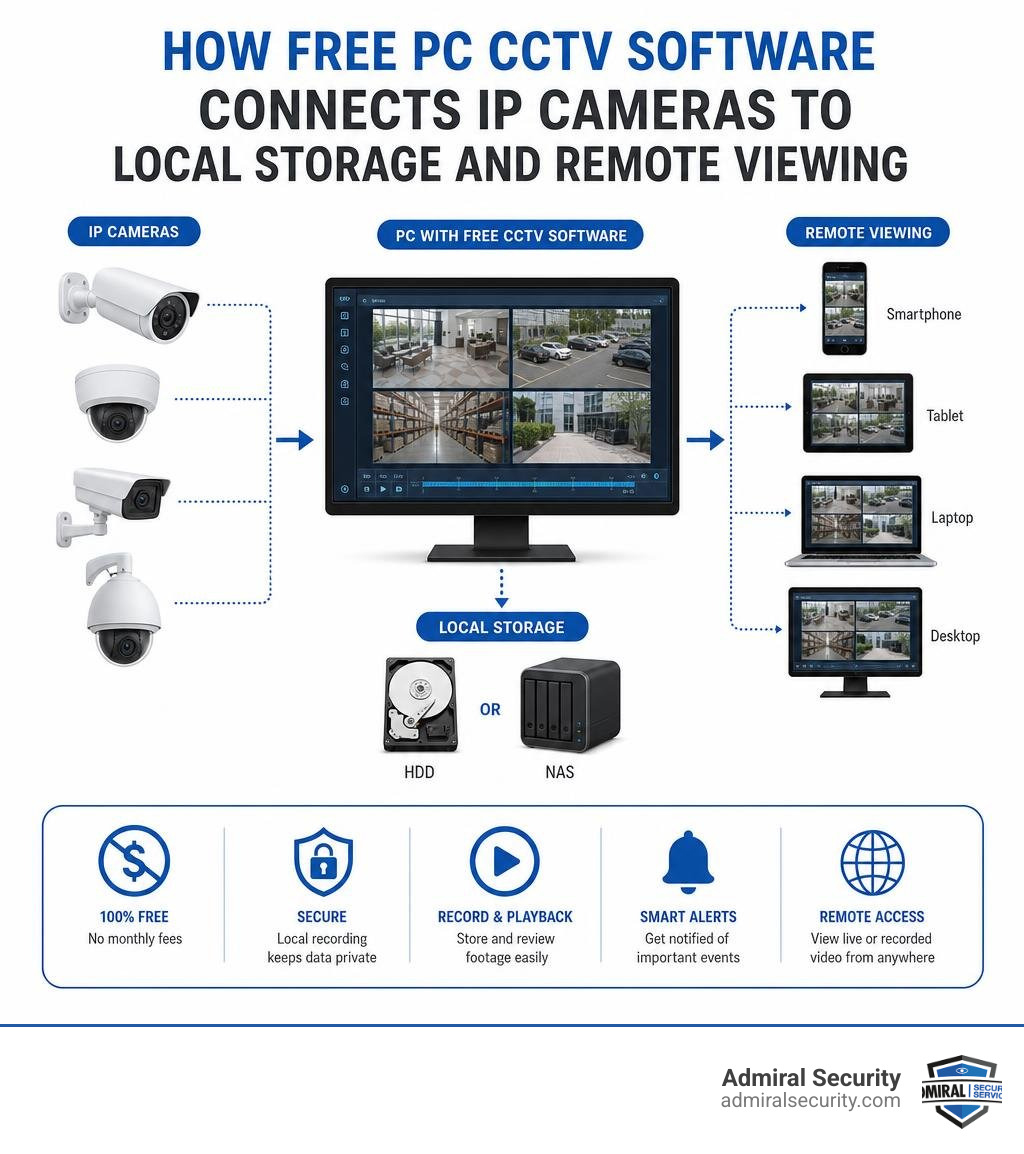
Setting up a camera system no longer means buying expensive hardware or paying monthly fees. A modern Windows PC, a handful of IP cameras, and the right software can give you a fully functional surveillance setup, whether you’re securing a retail location, a warehouse, or a home office.
The gap between free and paid surveillance software has narrowed significantly. Tools like Agent DVR and LookoutNVR now offer AI-powered detection, unlimited cameras, and remote access, all at no cost for local use.
But not every “free” option is truly free. Some cap cameras at one or two unless you pay. Others require a Patreon subscription to unlock basic features. A few are better described as free trials.
This guide cuts through the noise and shows you exactly what each option offers, what it costs in practice, and which one fits your situation.
Key Criteria for Selecting Free CCTV Software for PC
When I evaluate the best free cctv software for pc, I look beyond the price tag. A program that crashes your computer or misses critical security events is worse than having no software at all. To help you choose, I analyze these options based on several technical and practical benchmarks.
CPU Usage and Resource Efficiency
Some video management software (VMS) packages are incredibly resource-heavy. If you run ten cameras on an older Intel Core i5 processor, a poorly optimized program can keep your CPU usage pegged at 85% or higher. Efficient software leverages GPU acceleration (using Intel Quick Sync or NVIDIA NVDEC) to offload the heavy lifting of decoding video streams. This keeps your PC responsive for other tasks.
Camera Compatibility (ONVIF and RTSP)
Your software must speak the same language as your cameras. The industry standards are ONVIF (Open Network Video Interface Forum) and RTSP (Real-Time Streaming Protocol). ONVIF allows the software to automatically discover cameras on your network, control pan-tilt-zoom (PTZ) functions, and receive motion events directly from the hardware. RTSP is the universal video stream format that ensures compatibility with almost any IP camera on the market.
Motion Detection and AI Filtering
Basic motion detection analyzes pixel changes between video frames. While simple, it is highly prone to false alarms caused by passing shadows, rain, or insects. Modern free VMS solutions integrate local AI models (such as YOLOv8) to filter these alerts, ensuring you only receive notifications when an actual person or vehicle is detected on your property.
Storage Management
With H.264 or H.265 video streams, storage fills up rapidly. A standard 4MP camera recording continuously can easily consume 15 to 30 GB of storage space per day. Excellent free software includes robust storage management tools that automatically overwrite the oldest footage when your hard drive reaches a set limit, or allow you to schedule continuous recording only during high-risk hours while relying on motion-only recording during the day.
Top Free Video Management Software Options
Selecting the right platform depends on your technical comfort level and your specific hardware. Below, I break down the top free choices available in 2026.
Agent DVR: Advanced Free CCTV Software for PC with AI
If you are looking for a highly advanced, feature-rich surveillance platform, Agent DVR is hard to beat. Developed by the creators of iSpy, Agent DVR is a completely rebuilt, web-based video surveillance system that runs locally on Windows, macOS, and Linux.
One of the biggest advantages of Agent DVR is its support for an unlimited number of IP cameras, ONVIF devices, local USB webcams, and audio inputs. It operates via a local web browser interface, which means it is incredibly fast and responsive.
For smart home enthusiasts, Agent DVR integrates seamlessly with platforms like Home Assistant, Amazon Alexa, and IFTTT. You can set up geofencing so your cameras automatically arm when you leave your house and disarm when you return.
Its AI capabilities are extensive. You can connect it to local AI platforms like CodeProject.AI or DeepStack, as well as cloud-based models from OpenAI, Claude, and Gemini. This allows you to perform advanced object recognition, license plate tracking, and facial recognition without paying for expensive proprietary software.
To get started, you can download the installer from the official iSpy Connect website. While local use is entirely free, remote access outside your local network without complex router configurations requires a subscription. However, for local monitoring and smart home automation via MQTT, the free tier is exceptionally powerful.
- Pros: Unlimited cameras, deep smart home integration, zero local performance caps, cutting-edge AI integrations.
- Cons: Remote access requires a paid subscription; the web interface has a slight learning curve.
LookoutNVR: Modern Free CCTV Software for PC with Local AI
For those who want the power of modern AI detection without the configuration headaches of older systems, LookoutNVR is a standout choice. This self-hosted software is designed to run entirely on your local hardware with zero cloud dependency, making it a great option for privacy-conscious users.
LookoutNVR uses YOLOv8 object detection via ONNX Runtime. This means it can run highly accurate person, vehicle, and animal detection locally on your machine. If you have a modern NVIDIA GPU (such as a GTX 1050 or newer) or an Intel CPU with integrated graphics (iGPU) supporting Quick Sync, LookoutNVR can process dozens of camera streams with minimal CPU impact. In fact, a modest GTX 1650 can handle over 30 cameras at just 2% GPU usage.
The user interface is built for modern displays, featuring a beautiful, ultra-dense live view grid that looks spectacular on ultrawide monitors. It supports high-efficiency H.265 video encoding, which can save you up to 50% on storage space compared to older H.264 formats.
You can download the software directly from LookoutNVR, Free AI-Powered NVR Software for Windows & Linux. The local tier is entirely free, does not require an account or credit card, and places no limits on the number of cameras you can connect.
- Pros: Beautiful modern UI, highly optimized local AI detection, native H.265 support, zero cloud requirements.
- Cons: Lacks some of the legacy analog card support found in older software.
Genius Vision CmE: Lightweight VMS for Multi-Camera Setups
Genius Vision Community Edition (CmE) is a commercial-grade Video Management System made free for non-commercial use. If you are running an older PC or want a lightweight solution that does not hog system resources, Genius Vision is highly efficient.
The installation file is remarkably small, coming in at just around 15 MB. Despite its tiny footprint, it supports up to 16 cameras on its free tier. In my testing, running 10 high-resolution camera streams at 15 frames per second on an older Intel i5 processor consumed only 10% to 15% of the CPU, whereas some competitor programs pushed the same hardware past 60%.
Genius Vision CmE features a classic, highly stable desktop client. It includes a robust timeline playback system that makes it easy to scroll through recorded footage to find specific events. While the user interface looks somewhat dated, its stability and low resource consumption make it a highly dependable choice.
- Pros: Extremely lightweight, commercial-grade stability, supports up to 16 cameras for free.
- Cons: The interface feels like Windows 7-era software; configuring advanced settings can be complex for beginners.
XMEye VMS: Scalable Monitoring for Experienced Users
XMEye VMS is a widely used utility designed for managing IP cameras, NVRs, and DVRs on Windows PCs. With over 109,000 downloads, it is a popular choice for users who already own generic or Xiongmai-based camera hardware.
The software supports up to 64 devices simultaneously for real-time surveillance. This makes it incredibly scalable for users managing multi-site installations or large properties. It features a clean, multi-window grid system and allows you to configure camera settings, IP addresses, and firewall permissions directly from the desktop application.
One unique aspect of XMEye VMS is that its recorded video files are encrypted for security. To view these files on another machine, you must use the software’s built-in media player, which prevents unauthorized tampering with your security footage.
- Pros: Highly scalable (up to 64 devices), excellent for bulk hardware configuration, secure encrypted recordings.
- Cons: Setup can be technically challenging; requires manual network and port adjustments.
Security Eye: Simple Scheduling and Motion Detection
Security Eye is a straightforward, user-friendly program that can simultaneously manage IP cameras and standard USB webcams. It is designed for users who want a simple, reliable home security or baby monitoring system without dealing with complex network configurations.
The software supports up to 64 cameras and features an intuitive task scheduler. This allows you to set specific recording times, such as only recording during business hours or when you are away at work. It uses xVid encoding for video compression, ensuring that your video files remain compact while maintaining decent image quality.
Security Eye features a customizable motion sensor with masking tools. This allows you to select specific areas of the frame to ignore, such as a swaying tree or a busy street, to prevent false alerts. When motion is detected, the program can trigger an audible siren, send email alerts with photo attachments, or send SMS notifications to your mobile phone.
- Pros: Simple setup, excellent scheduling tools, supports both webcams and IP cameras.
- Cons: The free version is technically a trial with some screen overlays; lacks advanced AI object filtering.
AnyCam: Straightforward Single-Camera Monitoring
If you only need to monitor a single camera, such as a front door feed or a baby monitor, AnyCam is an incredibly simple and reliable option. The free edition supports one camera with lifetime updates and no expiration date.
AnyCam features an incredibly clean, minimalist interface. It includes auto-discovery for ONVIF cameras, making setup as simple as clicking a button. It supports PTZ controls, allowing you to pan and tilt your camera directly from your PC. Additionally, it can send instant motion alerts directly to your mobile phone via Telegram integration.
For those who want an offline installation option, AnyCam provides standard MSI and ZIP installers that do not require an active internet connection to set up.
- Pros: Incredibly easy to use, lightweight, lifetime free updates for one camera, convenient Telegram alerts.
- Cons: Free tier is strictly limited to one camera stream.
Open-Source and Cloud-Based Alternatives

If you prefer open-source software with active community support, or if you want to back up your footage to the cloud, several excellent alternative platforms exist.
iSpy: Highly Scalable Open-Source Surveillance
iSpy is one of the oldest and most popular open-source video surveillance applications in the world, boasting over two million users worldwide. It is highly compatible with almost every consumer webcam, IP camera, and audio device on the market.
Because it is open-source, you can download the full code repository directly from the iSpy GitHub Repository. iSpy is packed with advanced features, including facial recognition, audio event detection, and license plate reading. It saves all recordings locally to your hard drive, giving you complete control over your data.
- Pros: 100% open-source, massive community support, highly customizable.
- Cons: The legacy interface can feel cluttered and heavy on system resources compared to the newer Agent DVR.
Cayenue: Privacy-Focused Local Network NVR
For users who demand absolute data privacy, Cayenue is an outstanding open-source project. It is designed to view, analyze, and store video streams from a fleet of networked cameras in real-time while keeping them completely isolated from the internet.
You can find the project files and installation instructions on the Cayenue GitHub Repository. Cayenue uses YOLOX inference for real-time object detection, allowing you to double-click on alert images to jump directly to that exact timestamp in the recorded video.
To maximize security, Cayenue recommends running your camera network on a separate subnet. It acts as a secure proxy, buffering video streams locally so your cameras never have direct access to the web or your primary home network.
- Pros: Extreme focus on privacy, built-in proxy server, fast YOLOX AI detection.
- Cons: Highly technical setup; requires dual network cards on your server PC for true isolation.
CameraFTP VSS: Cloud-Based DVR Solution
If you are worried about an intruder physically stealing your PC or recording drive, a cloud-based backup solution is essential. CameraFTP Virtual Security System (VSS) allows you to turn any Windows PC or laptop into a cloud-connected CCTV system.
By installing the software from CameraFTP Virtual Security System, you can configure your connected cameras to upload footage directly to offsite cloud storage. VSS supports up to 25 cameras on a single monitor and includes unique features like screen recording, which is useful for monitoring employee computer use or remote learning environments.
- Pros: Offsite storage safeguards footage from local theft, simple setup, supports screen recording.
- Cons: Free tier is limited; continuous cloud recording requires a monthly storage subscription.
ZoneMinder: Linux-Based Open-Source Powerhouse
For those running a Linux-based PC or a home server, ZoneMinder is the gold standard of open-source surveillance. Licensed under the GPL-2.0, it supports IP, USB, and analog cameras.
You can view the source code and documentation at the ZoneMinder GitHub Repository. ZoneMinder is designed for multi-camera analysis and is incredibly robust. It can be installed directly from package repositories or deployed via Docker containers for easy management.
- Pros: Highly scalable, powerful multi-camera analysis, fully open-source.
- Cons: Does not run natively on Windows; requires intermediate to advanced Linux administration skills.
Frequently Asked Questions About PC Surveillance
What are the hardware requirements for running free CCTV software on a PC?
The hardware you need depends on your camera count, resolution, and whether you are using AI detection. For a basic setup with 1 to 4 cameras recording on motion, a standard dual-core 3 GHz CPU with 4 GB of RAM is sufficient.
However, if you plan to run 8 or more high-resolution cameras with local AI filtering, I recommend at least an Intel Core i5 or AMD Ryzen 5 processor, 8 GB of RAM, and a dedicated surveillance-grade hard drive (such as a Western Digital Purple). Utilizing H.265 video compression will significantly reduce both your network bandwidth and your storage requirements.
Are there hidden costs or camera limits in free VMS versions?
Yes, many “free” programs have limitations. For example, AnyCam’s free tier only supports a single camera stream. Genius Vision CmE caps free usage at 16 cameras and is strictly for non-commercial use. Other platforms, like Agent DVR, are 100% free for local use but require a monthly subscription to unlock cloud-based remote viewing, email alerts, or push notifications. Always read the licensing terms to ensure the free features meet your security needs.
How do these programs handle remote viewing and smart home integrations?
Most modern free VMS solutions support remote viewing, but the method varies. Programs like Agent DVR use secure WebRTC/SSL technology to allow remote access without requiring you to open ports on your router, though this typically requires a subscription.
Alternatively, if you are comfortable with networking, you can set up a secure local VPN (such as WireGuard) to access your local camera feeds on your mobile phone for free. Many of these tools also support MQTT, allowing them to send instant motion triggers to home automation platforms like Home Assistant.
Conclusion
Setting up your own free cctv software for pc is an excellent way to secure your property, analyze potential risks, and keep a watchful eye on your assets without incurring high software licensing costs. From the advanced smart home integrations of Agent DVR to the local AI power of LookoutNVR, the options available in 2026 are more capable than ever.
However, while software can monitor your cameras, true security risk management requires a comprehensive strategy. For businesses and organizations requiring professional oversight, local software is only one piece of the puzzle.
At Admiral Security, we provide complete, integrated security solutions tailored to your unique needs. We operate across Maryland (including Bethesda and Baltimore), Delaware (Newport), Virginia (Richmond, Virginia Beach, Lynchburg, Roanoke), North Carolina (Raleigh, Greensboro), Florida (Miami, Melbourne, Orlando, Tampa, Sunrise), Texas (Houston, Dallas, Austin), and Boston, Massachusetts.
Our services combine highly trained uniformed personnel with state-of-the-art technology integration to ensure your peace of mind. We pride ourselves on the “Admiral Advantage,” delivering trust, responsiveness, and professional expertise to every client we serve.
If you are ready to take your security infrastructure to the next level, explore our professional solutions at Admiral Security Technology Integration. We can help you design, deploy, and manage a commercial-grade surveillance system that keeps your operations safe and secure around the clock.